Friday, December 30, 2016

Peace on Earth... and in the Shack

Quieting a noisy power supply

With a bit of time over the Christmas break I'm finally getting around to work on things that have bugged me for a while... like my noisy power supply.


My TenTec Century 21 doesn't have a fan and it has a built-in power supply, so no fan noise.  My Elecraft KX3 has no fan, so no fan noise and it can run all day from a small 12v battery.  My TenTec Eagle only runs fans when the finals get hot and even then the fans are in the interior of the case and are speed controlled, low-speed, high-volume dudes that I have never heard. I can feel air moving through the Eagles vents so I know the fans work, their just silent.  But the Eagle needs an external power supply.

The calming sound of CW wafting forth from the Eagle is soon destroyed by a sound not unlike an air-raid siren emitted from my Astron power supply as it kicks its fan into high gear

Problem


My power supply has a single, large fan that makes me jump every time it whirs into action.  Admittedly, my power supply was near the bottom of the range in the Astron lineup.  I assume they have speed controlled fans, or at least quieter fans further up the product line.  I purchased this one used, about 9 years ago, so who knows, maybe their new power supply's have speed controlled fans.

Anyway, on my model, the muffin fan produces a hurricane force blow switched by a thermocouple located on the transistor heat sink (right hand side).  It is a very simple design... when the thermocouple trips it closes a circuit to the fan.  When heat sink temperature falls below the threshold it cuts off.  So the fan is either ON or OFF.  Normally the fan doesn't come on when the rig is idling, and it will only come on once in a while at QRP levels.  I just never know when, but I'm always anticipating... like the jerk kid that would flick your ear when he walked by back in school (hmm, I feel as though I may have some un-dealt with issues from childhood).

The fan seems to have a knack for coming on when I'm working a station that is fading into the noise and remaining on until I've missed some key piece of the QSO.

Solution


What I wanted to do was keep the air moving like a gentle breeze rather than a pulsing Category 5, but still allow the fan to come on full speed if needed.  So the trick was to get the fan to run continuously at a slow speed whenever the power supply was on but still allow the thermocouple to give it the gas.

The label on the fan says it's 1.4w 12v... I rummaged through my junk box looking for 2w and higher resistors.   I didn't find a lot to choose from, since I just haven't been at this electronics building stuff all that long.  I had a number of very low resistance ones from 2 ohm to 20 ohm and everything else was 650 ohm or higher.

I clipped test leads to both sides of the thermocouple on the heat sink that controls the fan.  I wanted to try different resistor values to see what happened.  Predictably, the low value resistors acted pretty much like a closed circuit and the fan ran near full speed.  I could have strung a number of the low value resistors in series but that seemed messy and the values were mostly very low.  I tried my next lowest value 2-watt resistor, 650 ohm.  The fan didn't even come on with 650 ohm resistance.  I didn't have anything in between so I put two of the 650's in parallel and it turned verrrry slooowwwly.

You can find TOTAL RESISTANCE in a Parallel circuit with the following formula: 1/Rt = 1/R1 + 1/R2 + 1/R3 + ... "

Ok I was on to something.   Turned out that 5 of the 650 ohm 2w resistors in parallel did the trick... That turned out to be near 130 ohm.  I left them hooked up for an hour or so to make sure more current wasn't being pulled than I expected, and they only became slightly warm to the touch so I figured my redneck engineering was good to go.  I soldered the bundle of resistors leads in parallel and used some heat shrink to keep it neat.

I've used the power supply for a good part of a day and it stays nice and quiet now.  Not silent, but good enough to where I can't hear it at all with my headphones on.  A key down test into a dummy load at QRO power repeated times confirmed that the fan will go to full speed after a while but in normal operation, the thermocouple never triggers.

By my low standards, I deem this a success.


redneck ham engineering

Perform this mod at your own risk

This is certainly not a manufacturer approved modification and your power supply may be quite different than mine so tinker at your own risk.  Oh, and be careful when you have the cover off a power supply there are multiple, high voltage components in there.  Make sure it's unplugged and has plenty of time to bleed off power from the big capacitors before you start messing with anything in there.


That's all for now

So lower your fan speed and raise your quality of life...

72/73
Richard AA4OO

Thursday, December 29, 2016

Making your old Morse straight key look the part

Vintage Wiring

In honor of the upcoming SKN I wanted to spruce up my Kent Hand key by replacing the ratty cable that I'd hastily made back in 2015 by hacking a cheap, old electric guitar cable with something more suitable to the Kent's grande and imposing nature.

I also wanted a vintage look.  I've always liked the look of old fabric covered wires, although not their dubious safety record.  But alas, modern times and a desire in some quarters for a "retro-look" for antique lighting gives us cotton covered, dual conductor, twisted wire.  The actual stranded wire core is covered by teflon covering for proper insulation.

Cotton covered wire to suit the key

Making your cable

Fabric covered wire is available from a number of sellers and provides a vintage look for your old CW straight key.  There appear to be mainly two different types of fabric covered wires, Rayon and Cotton.  The Rayon covered wires look "shiny" due to the synthetic material, they also are likely sturdier.  Cotton covered wires are not shiny and get a bit fuzzy with handling.  I went with Cotton covered wire but I'm sure Rayon would be fine too.

You can't just use wire cutters or a wire stripper on the cloth covered wires.  That just makes a fabric "blob" (ask me how I know).  I used a very sharp knife to cut the fabric around the insulation where I was going to strip, then used a wire stripper on the teflon covered portion of the wire.  Also note that cloth fabric will fray when it's been cut so use some heat shrink tubing to neaten it up, or if you really want to get fancy; lash the fraying bit with some thread for a half inch or so and tie it off.  I'm not patient enough to do that so I used heat shrink tubing.  I used another piece of larger heat shrink around both conductors further up the wire to keep them from unwinding.

If you use Rayon covered wire be careful with the heat gun when you shrink the tubing, as the Rayon probably has a low melting temperature.

Lastly, since the new cable is un-shielded, keep lengths reasonably short so as not to become RF conductors in the shack.


That's all for now...

So lower your power and raise your expectations.

72/73
Richard AA4OO
http://hamradioqrp.com

Tuesday, December 27, 2016

Go straight on Jan 1, 2017 with the Navy

ARRL Straight Key Night is January 1 starting 0000 UTC


I have a new straight key for the upcoming ARRL Straight Key Night...

Navy Flameproof Key in need of some TLC

A recent low-bid, on a famous auction site, netted me this Navy Flameproof key.  A mismatched screw and nut from my Nye Viking key is serving  as the closure spacing adjustment until I get a replacement screw and nut specific to the Flameproof from JH Bunnell Co.  I've been using it on the air and it has a distinctly different feel from my other straight keys.  There's a lot going on inside that little enclosure.

I will have this key as well as my Kent Hand Key on-the-air during this year's straight key night driving my 1977 TenTec Century 21 CW rig

Kent Hand Key in front of TenTec C21


ARRL Straight Key Night


Straight Key Night (aka SKN) occurs on the first day of each year (beginning at 0000 UTC) and runs for 24 hours.  In addition to dusting off your straight key, it has sort of become a tradition to drag out all the vintage equipment you can muster and get it on-the-air.  


What should you expect on SKN?

Last year I heard old tube rigs with a power supply issues causing chirp to rival the loveliest song bird and shaky FISTS that required full concentration to decipher.  I had a grand time hearing paddle-only operators trying to regain the knack for using their straight keys, and I could almost smell the dust burning off the tubes of those old rigs that hadn't been fired up in a year.

When you send your CQ also send SKN if you'd like.  This is not a contest and there are no awards for the most contacts, so have some good ragchews and get to know the fellow on the other side of the key.  Enjoy the slow(er) pace of working straight key stations and settle in for interesting QSOs.

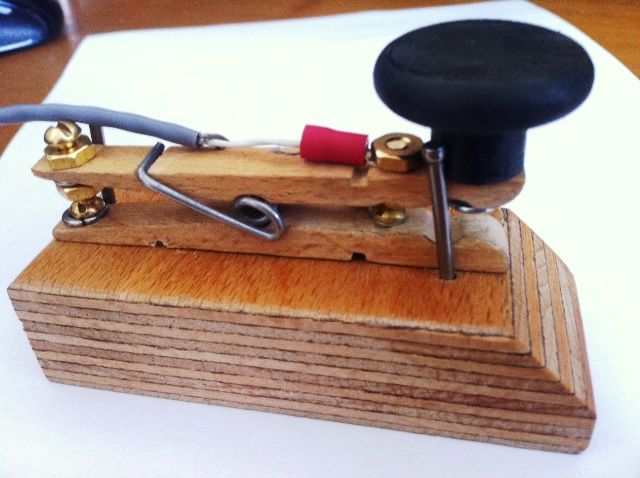
Although you'll hear a lot of vintage equipment, that is certainly not required to get on the air. If you don't have a straight key you might just have a clothespin and some screws...


SKN times...


Don't forget SKN begins at 0000 UTC which means for those of you on the East coast of the US SKN starts 7pm December 31st and for those of you on the left coast it begins at 4pm, So you can get a few hours in before the bell tolls 2017 for your time zone.  


SKN runs for 24 hours, but don't put away your straight key just because it's over.  Join in the fun with the SKCC all year 'round.


That's all for now

So lower your power and raise your expectations...

72/73
Richard, AA4OO  

Saturday, December 24, 2016

Merry Christmas 2016

A Ham's Night Before Christmas

The snow inside is frightful


'Twas the night before Christmas,  
And all through two-meters,  
Not a signal was keying up  
Any repeaters.

The antennas reached up 
From the tower, quite high, 
To catch the weak signals 
That bounced from the sky.

The children, Tech-Pluses, 
Took their HT's to bed, 
And dreamed of the day 
They'd be Extras, instead.

Mom put on her headphones, 
I plugged in the key, 
And we tuned 40 meters 
For that rare ZK3.

When the meter was pegged 
by a signal with power. 
It smoked a small diode, 
and, I swear, shook the tower.

Mom yanked off her phones, 
And with all she could muster 
Logged a spot of the signal 
And the DX Packet Cluster,

While I ran to the window 
And peered up at the sky, 
To see what could generate 
RF that high.

It was way in the distance, 
But the moon made it gleam - 
A flying sleigh, with an 
Eight element beam,

  And a little old driver 
Who looked slightly mean. 
So I thought for a moment, 
That it might be Wayne Green.

  But no, it was Santa, 
The Santa of Hams. 
On a mission, this Christmas, 
To clean up the bands.

He circled the tower, 
Then stopped in his track, 
And he slid down the coax 
Right into the shack.

While Mom and I hid 
Behind stacks of CQ, 
This Santa of hamming 
Knew just what to do.

He cleared off the shack desk 
Of paper and parts, 
And filled out all my late QSLs 
For a start.

He ran copper braid, 
Took a steel rod and pounded 
It into the earth, till 
The station was grounded.

He tightened loose fittings, 
Resoldered connections, 
Cranked down modulation, 
Installed lightning protection.

He neutralized tubes 
In my linear amp... 
(Never worked right before- 
Now it works like a champ).

A new, low-pass filter 
Cleaned up the TV. 
He corrected the settings 
In my TNC.

He repaired the computer 
That would not compute, 
And he backed up the hard drive 
And got it to boot.

Then, he reached really deep 
In the bag that he brought, 
And he pulled out a big box. 
A new rig? I thought!

A new Kenwood? An Icom? 
A Yaesu, for me?! 
(If he thought I'd been bad  
It might be QRP!) haha

Yes! The Ultimate Station! 
How could I deserve this? 
Could it be all those hours 
That I worked Public Service?

He hooked it all up 
And in record time, quickly 
Worked 100 countries,

All down on 160. 
I should have been happy, 
It was my call he sent. 
But the cards and the postage 
Will cost two month's rent!

He made final adjustments, 
And left a card by the key: 
"To Gary, from Santa Claus. 
Seventy-Three."

Then he grabbed his HT, 
Looked me straight in the eye, 
Punched a code on the pad, 
And was gone - no good-bye.

I ran back to the station, 
And the pile-up was big, 
But a card from St. Nick 
Would be worth my new rig.

Oh, too late, for his final  
Came over the air. 
It was copied all over. 
It was heard everywhere.

The Ham's Santa exclaimed 
What a ham might expect, 
"Merry Christmas to all, 
And to all, good DX."

Permission granted for any print 
or electronic reproduction.


A Morse Code Christmas message 


Richard, AA4OO 


Wednesday, December 21, 2016

Ewww Cooties

Take a swipe at it

The "Cootie" key or "Sideswiper" is basically a double-sided straight key and has a reputation for being very hard to learn, possibly harder even than the Vibroplex Bug.  My recent bug practice has been going well so I figured I would add a new level of difficulty by adding a completely different style of key into my brain mix... 

A Cootie key


Using a Palm Single in Sideswiper mode.  It is magnetically attached to a solid steel base.


My Palm Paddle Single has an internal adjustment that turns it into a sideswiper... 

Instructions for turning the Palm Single into a Sideswiper

That means that touching either side of the paddle closes the tip contact of the key jack, rather than operating the ring and the tip independently.   

Cooties?

Google "cootie" and you come up with 'body louse'... well at least you come up with that definition.  (hopefully you don't actually get body lice).  We are talking about a different kind of cootie here... 

Morse Express has an article with an excellent description and history of the cootie key here.  

I had some interest in operating a sideswiper because a good friend of mine Kurt (N4KJK) uses one regularly and I admire his skill with it.  I spent a short time in 2015 practicing with my Palm Single as a sideswiper and was horrible.  I quickly gave up.  Now with another year of CW in my brain and different types of keys (straight, iambic paddle and bug) swimming around my consciousness I took another shot.

I figured that I would spend an hour practicing side-swiperry and if I was making some progress I would continue the process, and maybe build a real side-swiper key using a hacksaw blade.  Before building a key I wanted to practice with what I already had.  I spent an hour this morning practicing sideswiper style with the Palm Single in Cootie mode and I went from really terrible to simply terrible, which in my book is great progress.

Level of Difficulty ?

You might have heard that the sideswiper is hard to learn... In general I'd say it is very different to what you may have already learned.  If the sideswiper were the first key you tried to use you might have no more difficulty learning it that anything else.  The problem is that it's completely different than EVERY OTHER morse key in the way it's operated.

The sideswiper is operated by swinging your thumb and forefinger back and forth rhythmically, where each opposing finger operates the key once for an individual element, rather than repeating any elements on one finger.   For a straight key you are always operating in the same direction... down.  Repeating elements, say the 3 DITS in an 'S' are repeated downward on the key.  In the case of a paddle or bug, your left thumb is pressing to repeat the 3 elements of an 'S'.  In the case of the letter 'O', your right index finger (or fingers) are accomplishing the repeating elements (DAHs in this case).  In the case of the sideswiper/cootie each finger participates in repeating elements and the order in which finger begins the process is completely up to chance.   So for an 'S' or an 'O' you might start with the thumb or the index finger depending on which finger last operated the key... the finger that's swinging toward the key at the time performs one element of the character then leaves the next element to the other finger...
"Arrrgh... it burns, it burns"
This is so completely different than operating other keys you simply must practice the mechanics that you've painstakingly built into your hand away to the beautiful simplicity of the cootie.  Or at least that's what I'm telling myself.

So operating a bug takes some getting used to because you are timing the inter-character element transitions from index finger to thumb rather than an electronic keyer, but at least it's similar enough to a paddle that you are expecting to do the DAHs with your index and middle finger and your DITs are always accomplished by your thumb.  

The old rules are gone.  All your finely tuned muscle memory is thrown to the ether.  You are freed of preconceptions of sending code and you become "Ambidextrous" with regard to DITs and DAHs.  All your political affiliations are out the window as you now are able to approach a character from the  RIGHT or LEFT.

Ok I'm obviously just being silly now but maybe you get my point.  Give the sideswiper a try.  It will absolutely clean plaque out of your brain.  I'm fairly certain that just as learning and using Morse Code staves off brain disease... using all 4 types of Morse code keys in a round-robin fashion (Straight, Paddle, Bug and Cootie) will make your brain look like a young Arnold Schwarzenegger back in his Mr. Universe days.

Video


Here's a demonstration after an hour of practice... be kind in the comments section :)


That's all for now

So lower your power and take a swipe at your key... from both directions

72/73
Richard, AA4OO 

Tuesday, December 20, 2016

Now where did I put that?

HamRadioQRP now has a TOC

This blog has grown a bit over the past year since I do tend to blah, blah, blah about things.  

The standard blogger toolbox allowed me to add a search box (located in the upper right of desktop viewed pages) and an "archive" tab that allowed you to choose a month of posts in the past, but it has become difficult to find a particular post and there was no built-in way to offer a Table of Contents.

So this week through some Javascript wizardry I added a Table of Contents page.  This is accessible from the menu bar at the top on desktop versions of the site.  

If you visit using a mobile device the site formats to a more mobile friendly display and you can't see the menu bar in its entirety.  If you're viewing on a mobile device you have to touch the bar near the top of the display labeled "Home" and then choose "Table of Contents",

Now when I add new posts they will be automatically added to the TOC in an alphabetized list.  Newer articles will be marked with "New".  Unfortunately I'm a bit too clever with the titles of many of my posts; so often times you can't really tell what a post is about without clicking on the title but at least the opportunity to go exploring is available now.

Additional categorization coming

I'll be adding some additional subheadings to the TOC as I figure out how to better divide the content.  

This blog has grown a bit beyond my initial plans.  I originally intended it to simply be a sort of personal journal of what I was discovering as I learned about QRP and Morse Code but based on the response of viewers, my musings seem to have become useful or at least entertaining to other ham radio operators.  So hopefully the TOC will make it easier to find older content than scrolling page by page into the past.

Just a reminder that this blog is my own journey of discovery and I am far, far from an authority on most of what I write about.  I often find out that I'm quite mistaken about something I've written so take the information you find here with a double bag of salt :)

Questions or ideas for new posts?

As you read the blog, if you have questions or corrections and even suggestions for new posts please add comments to any of the posts.  I try and check on comments at least once a week and I'll follow-up as I'm able.


That's all for now

So lower your power and raise your expectations...

72/73
Richard, AA4OO

Thursday, December 15, 2016

QSO fun with a C21

It doesn't get much simpler

After dinner tonight I headed up to the shack to make a couple of QSOs.  I felt nostalgic and powered up the old TenTec Century 21 rather than one of my modern radios.  

My Vibroplex Bug and Kent Hand key are connected in series and I plugged into the straight key input on the back of the C21. I tuned as near to 3550 kHz as I could determine from the somewhat vague VFO dial and listened for a clear frequency.  I adjusted the output until I was producing somewhere around 10 watts to my lovely, no-tune OCF Dipole.  This old radio doesn't have a tuner so it's nice to use an antenna that is resonant on the bands the I use.

I turned on my camera, sent my call out once and was immediately answered by Dick (WB3AVF) up in Pennsylvania.  Turns out he was using a Standard Vibroplex bug that is very similar to mine.  It was my first contact with WB3AVF and we had a nice chat.

Fired up the 1977 TenTec Century 21 for a couple of old-fashioned QSOs

Switching the keys around


Dick and I had a couple exchanges and then he switched from his Vibroplex bug to a straight key so I followed suit on my next exchange, using my ever so clackety-clackety Kent Hand Key.

Vibroplex Bug and Kent Hand Key... both date to long before I became a Ham


The joys of an old radio


If you watch the video you'll note me chasing around the caller with the TenTec's audio offset knob.  I wasn't changing frequency with the VFO, I was trying to keep his signal in the audio bandpass sweet spot on the C21.  Unfortunately, my offset knob has become extremely touchy; as you can see in the video.  When I barely touch it, it will jump by a 100 Hz so it's fiddly to use.  I need to open up the rig again and find the out of spec components.  Maybe a Christmas project but I'm kinda hoping I get a new transceiver kit to build this year.  I keep planning to work on the C21 but other projects get in the way.

You can hear that the VFO drifts a bit as it warms up. That was the first QSO after turning on the radio so you'll hear after every exchange that Dick's station had dropped in frequency a bit and I was compensating with the offset knob.  He probably had to chase me about 300 Hz during out QSO while the components stabilized.

This C21 is from 1977 and uses a direct conversion receiver allowing you to hear the same station on both sides of the zero beat.  That makes for interesting zero beating...  I normally tune from a higher frequency to lower while keeping the offset set to the high side of the zero beat, about 600 Hz.  That way as I approach a signal and it's pitch decreases from high to around 600Hz I know that I'm on the correct side of the pass band.  If QRM becomes bad during the QSO I'll use the offset knob to jump to the other side of the zero beat and often that gets me away from an interfering station by moving their received "pitch" out my audio passband.  It's more complicated to explain than demonstrate.  I didn't do that during this QSO but, trust me it works well unless the band is really crowded.


The offset knob works on both sides of the signal due to the direct conversion receiver in the C21

Conditions

Band conditions on 80m were nice tonight.  I was outputting around 10w and Reverse Beacon network showed that I had good coverage to the North which my antenna favors.

http://www.reversebeacon.net/dxsd1/dxsd1.php?f=0&c=aa4oo&t=dx
I saw decent RBN spotter reports even though I was using low power and my antenna is compromised for 80m use since it is only 25 feet above ground at it's apex and slopes down to 10 feet AGL on the long end of the OCF.

You can see that one report was as high as 34 db over noise and 9 reports were 20+ db over noise range, so not too shabby for the poor solar cycle and low power.  There were some faint static crashes, which are frequent on 80m especially in the summer but they weren't bad tonight.  

I really enjoy the 80m band in the winter for ragchewing in the evenings. Other than QRN it's much lower band noise for me and not as busy as 40m.  I can use my older radio without trying to dodge QRM from close packed stations.


Right after the first QSO was over I was called from different station, also in PA, and that operator was also named Dick.  So it was an evening of QSO coincidences.   

Make some calls and see how many QSO coincidences you enounter.


Ah.. the sounds of a 1977 QSO... 

I hope you make it to the Kent Straight key clacking toward the end


I'm glad I had the camera rolling when WB3AVF answered my call.  I enjoy listening to a two-way Vibroplex bug QSO.  I know the copy is a bit rough in a couple of places since I had not warmed up prior to the QSO. I normally need 15 minutes or so of time with my bug to smooth out my sending, and that didn't happen tonight.  If I can make the time, I'll add a transcript. Or if someone wants to send me a transcript of this QSO I'll give them full credit and include it here.


That's all for now...

So lower your power and raise your expectations... (and use old crufty radios)

72/73
Richard, AA4OO

UPDATE:
I've added a video detailing operation of a Century 21...


Monday, December 12, 2016

The SKCC is a rewarding group

AA4OO achieved SKCC Tribune x4 status

The SKCC (Straight Key Century Club) is a fast-growing and well run group dedicated to supporting and promoting mechanical key, CW operators.  Mechanical CW keys are pretty much anything other than a paddle and electronic keyer. 

When making SKCC contacts you can use a straight key, a side-swiper (cootie key) or a bug to count towards your contacts.  If a medical condition prevents you from effectively using a mechanical key special wavers are allowed for using paddles with a keyer.


I joined the SKCC group in August of 2015 shortly after I got on the air with my budding Morse Code skills.  The group offers monthly and special contests especially suited for new CW operators due to the more laid-back speed of the code being sent by mechanical key operators. You can continue to obtain points contacting other operators at any time, not just during the contests. The SKCC group appeals to seasoned operators as well due to all the special categories of awards that can be obtained and the good natured comradarie among the operators.


AA4OO's Tribune x4 certificate

The SKCC does not collect any dues but donations are welcome as well as volunteering to serve in different roles.


Tongue in cheek awards

After finishing this past weekend sprint (WES) I'd accumulated enough additional contacts since obtaining my initial Tribune status to progress to Tribune X4 (every additional 50 unique operators is a x1).  The SKCC has a well written logging application that is both a logging program and award application processor.  It can parse ADIF files from other logging programs to help you keep track of your unique SKCC contacts over time.

When you submit an award application and are approved, you get a fun and silly email like the following:

Hear Ye! Hear Ye! Gather 'round and pay heed to the news of this day!Let there be revelry & celebration for yet another Centurion has advanced to the Tribune Tx4 level of SKCC achievement !!!
Rich Carpenter, AA4OO, SKCC# 14276T, has achieved the coveted 2nd generation SKCC member achievement known far and wide as the Tribune Tx4 award.
The Tribune Tx4 award is earned by SKCC Centurions who work 200 other Centurions, Tribunes, or Senators.
Rich's log & application were submitted to the Tribune Administrator. The Tribune award Analysis Team performed an exhaustive review of the submitted documentation. The process confirmed that all of the 200 required contacts had indeed been made with established SKCC Centurions, Tribunes or Senators subsequent to Rich's Tribune date.
Having submitted a log and sworn statement, both of which have survived the intense tests used by the Tribune administrator, Rich Carpenter, AA4OO, is duly proclaimed to be SKCC Tribune Tx4.
This SKCC member shall, from this day forward, proclaim to all that their SKCC Number ends with T. He shall enjoy all the honor and privilege that appertains thereto and all shall accord him the esteem and respect appropriate to their achievements.
Tribune Xn Operators are permitted to use the Xn designator as they see fit whenever discussing their Tribune status.
The Master Tribune List has been duly scribed where all SKCC Members may reflect upon and pay tribute to this momentous achievement.
Congratulations to: Rich Carpenter, AA4OO, SKCC# 14276T, Tribune Tx4
Duly approved, recorded, and published.
I set forth my hand and key on 12-Dec-2016
Phil Barsky, K3EW
SKCC 10605T
SKCC Tribune Administrator


Sign up and contribute 

If you're not already an SKCC member and you enjoy using a mechanical key sign up and get in the mechanical CW fun.

The regular monthly sprints occur on the second weekend of each month and are called the WES (weekend sprint).  The suggested CW watering holes are near the following frequencies: 1.820, 3.530 , 3.550, 7.055 , 7.120, 10.120, 14.050, 14.114 , 18.080, 21.050, 21.114, 24.910, 28.050, 28.114, 50.090, 144.07.

The typical exchange during a WES is as follows:

Calling:  CQ WES DE [CALL]  K
Send: DE [CALL]
Exchange:  UR [RST]x2 [STATE]x2 [NAME]x2 [SKCC NR]x2 BK
If you want to chat a little or throw in a good morning, afternoon or a TNX and GL (thanks and good luck), no one is going to mind.  These are not high pressure contests.

Long ragchews are encouraged

Outside of the WES I've had many long ragchews with other SKCC members.  They always seem to be in the mood to shoot the breeze with you and talk about their stations and different keys as well as their grandkids and local going-ons.  Long ragchews are encouraged so much that there's a special Marathon award for those operators that have participated in 100 QSOs lasting 60 minutes or longer with other SKCC members.  That's about as far from normal contesting as I've found.  

Contesting not required

I am far from a contester and I don't participate in every WES, in fact I'm pretty hit or miss.  I think I probably accumulate more SKCC contacts through casual operating during nights and weekends than directly in a WES but if you want to rack up the contacts the sprints are the place to do it.

Not specific to QRP

The SKCC is not limited to QRP operators but they have special award classifications for QRP SKCC contacts.  I haven't applied for any of those because I don't keep precise enough records of when I'm solely operating QRP or if I bumped up my power to maintain a QSO but you'll certainly work a lot of QRP stations who are SKCC members.  A simple homebuilt QRP radio operated with a mechanical key can be a satisfying part of the hobby.

If you're new to CW or you've been sending code for 50 years I think you'll enjoy the group. 


That's all for now...

So lower your power and raise your expectations... using that mechanical key

72/73
Richard, AA4OO

Sunday, December 11, 2016

Gamify Morse Code

Morse Toad -- the game

I've been looking for ways to interest others in learning Morse Code.  I've found good mobile apps for learning the code but they are for serious study and not in the form of a game. 

Young people are really into their mobile game apps and they always seem to be on the lookout for new mobile apps to try.

There may be other mobile app games that use morse code but this is the first one I've run across.  Morse Toad app is available for both Android and IOS.  It might, just might, be fun enough to get people to learn the code for the fun of it.

It's a bit of a silly game but there are lots of silly games out there and people still seem to play them.  So now you can show the folks you see with their nose buried in their smart phone; tap, tap, tapping away at some game about a really challenging brain teaser game.  "Morse Toad"

Before you know it there will be millions of new Morse Code operators just itching to get their Ham ticket (unlikely).


Game Play

The game begins by presenting the player with a couple of letters lit on a keyboard (A and T).  Then it plays a sound and the player has to tap the correct letter.  After each successful level another letter is added to the keyboard.

Obviously this isn't much of game for someone that already knows the code but it might prove interesting enough to hold someone's attention long enough for them to actually become interested in learning Morse Code for real.

My wife made me stop playing it after a couple of levels, she hears enough morse code in the house without this being added to the mix, but I'll find my headphones and see how far I can get.


Game Availability

Morse Toad is available for download from the Google Play Store or from the Apple App Store.


That's all for now...

So lower your power and raise your expectations

72/73
Richard, AA4OO

Saturday, December 10, 2016

No love for my station from RBN on 10m today?

RBN is a great tool but sometimes it doesn't tell the whole story

Since it's the second weekend of the month I got on the air to make SKCC WES contacts.  The SKCC Weekend Sprint is great fun because it's a slow paced, friendly, pseudo contest for SKCC members.  There's even a page that you can schedule a contact with another SKCC member if you're needing their state, grid square, another Senator, whatever.  Well, this post isn't really about the SKCC WES other than to give it a plug that it's super fun for both those new to CW and old-timers as well wanting a slow paced alternative to high pressure contests.  And no one gets mad at you for using a bug.

I like to use RBN to determine if I'm getting out on a band before I spend too much time sending my call.  I find an open frequency, send my QRL? a couple of times and then send my call.  If no one responds I take a look at the RBN report.

RBN spot search for AA4OO

Band conditions

I was working SKCC members on 20m because I've worked all the nearby states and it was not giving me great results.  Everyone seemed a bit in the noise which isn't unexpected given the current lousy band conditions.  So I opened up RBN to look for spots from AA4VV who is a spotting station within about 50miles of me.  Looking at a nearby spotting station using RBN DE spot versus DX spot shows you what they are hearing from all the bands they cover and it showed activity up on 15m. Other spotting stations were even seeing traffic on 10m today.

10 meters?  In this lousy part of the solar cycle?

So I hopped up to the CW portion using my mighty attic doublet and heard a bunch of stations sending CQ at 27 - 35 wpm.  Well, they likely were not SKCC dudes since even the SKCC bug operators usually stay below 23wpm. I found an open frequency and sent my call out a few times and no one responded.  I checked RBN and it only showed one spot for me up in Wisconsin with a lousy 5db over noise report.  No one was going to hear me that close to noise.  But obviously there was a lot of traffic on 10m so I went up to the phone portion of the band around 28350 kHz and heard dozens of operators working a 10m contest. Of course this wasn't the SKCC WES but I responded to a couple of them and what do you know, they heard me, and in most cases I didn't have to repeat my call or my state report.  Now most contesters don't take the time to give an honest signal report and I received 59 from all of them except a couple of the more laid back operators giving honest reports, but the point was I was getting out on 10m just fine.  There was a station who was only S5 to me for whom I had to repeat my call and state about half a dozen times to complete the contact.

So why didn't I get any love from RBN spotting stations when I was obviously getting out well on 10m?  I don't have an answer. Maybe many of the RBN spotters have stopped monitoring 10m.  10m wasn't flying as far as it normally would as I was making contacts with stations in MI, WI, OK, and AR.  I was hearing stations in UT but they were very weak. I only made one DX contact in Mexico, but the band was open for my station.  I was using my attic doublet which is about 68 feet long.  I've tried modeling it but I'm not too practiced with the modeling tool, but what I have modeled estimated that on 10m I may get 9-12 db of gain in some directions which I'm guessing accounts for the strength of my signal on SSB.  

The point?

RBN and other spotting tools don't necessarily always tell the whole story.  Just because you aren't getting spots doesn't mean you aren't getting out.  I had to quit shortly after making a dozen SSB contacts on 10m but next time I'll be more diligent and try to schedule some SKCC contacts on 10m when I'm hearing stations from their region, no matter what the RBN is telling me.  I'm still missing some SKCC operators on the west coast and up in Alaska.  Given the lousy state of the solar cycle I'm unlikely to get them on the lower bands so I'll keep an eye out for when 15m or 10m opens up.  

The band conditions may be very poor right now but radio is still magic.


That's all for now

So lower your power and raise your expectations

72/73
Richard, AA4OO

Sunday, December 4, 2016

Make the RF jump

Constructing an RF jumper cable for BNC to PL-259

HF QRP radios and accessories typically use BNC antenna connectors.  But most HF amatuer station equipment like antenna switches and tuners are designed for PL-259 connectors.  Adapters are available to convert between the two but every additional connection adds some resistance with a bit of loss.  Plus, all those adapters add weight and create torque on fragile QRP BNC connectors.


BNC to PL-259 jumper cable

As the number of connections between radios, switches, meters and tuners increases the number of adapters you need to adapt different connector types becomes a bit crazy. I have a box of the things and I still run into configurations where I don't have the right combination.  

50 ohm jumper cables between different connector types can be purchased, but making them yourself will both save you money and will increase your Ham mojo.  Usually "crimp-on" connectors, which are a bit of a misnomer because soldering is required, can be purchased for less than $1 per connector.  While the braid is "crimped-on" the center conductor should be soldered to the center pin.

RG-58A/U (flexible, stranded center conductor) is inexpensive and suitable for jumpers.  It has more loss and less power handling than larger coax cables but given the short length of jumpers the loss is not significant at HF frequencies and is suitable up to 100w.  Note that RG-58 coax is solid conductor.  Stranded is more flexible and durable (usually noted as RG-58A/U).

Equipment needed

Besides a soldering iron you'll need the following, and some heat shrink tubing if you wish to make it look neat.

RG-58A/U, Crimper, Coax stripper, PL-259 and BNC connectors

Trying to crimp a connector with pliers will only bring you grief (trust me I know).  Additionally, trying to strip your coax with a knife rather than a dedicated tool will lead you to use vocabulary that would make your momma wash your mouth out with soap.  A decent crimper and coax cutter are not expensive and will save you a ton of time as well as make your work go much quicker.

Bring out the stripper -- No bachelor party required


Stripped coax
The coax stripper tool has two blades which are adjusted for cutting depth as well as spacing.  You will need to sacrifice a bit of coax for test cuts as you adjust the blade cutting depth.  One blade should be adjusted so that it just barely cuts through the outer sheath without cutting the braid while the second blade is adjusted to cut deeper, through both the outer sheath, braid and insulator around the center conductor without touching the conductor.

Once you've adjusted the blades no further adjustment should be required as long as you're using the same coax.  Just be patient as you get the settings correct.

The length of insulator remaining over the center conductor will be longer for the PL-259 versus the BNC.  Watch the video for how to measure.

Connectors


PL-259 and BNC crimp-on connectors

Note that both connectors come with a sleeve that will be crimped over the knurled section of the connector, clamping the shield braid against the knurled section of the connector.  

Note in the photo that the BNC center conductors are not built into the connector. Their center pins have to be carefully placed over the center conductor of the coax and soldered before inserting through the BNC connector body.  The length of the center conductor above the folded braid is important so be prepared to sacrifice one or two connectors to get the hang of it.

When you cut the coax you need to leave enough center conductor to emerge out through the center tip of the PL-259 so that solder will wick down the center.

For the BNC you will trim the center conductor shorter so that it just fits inside the center pin and comes to the correct length when the connector is placed over the cable.
Very Important... Don't forget to put the crimp tube and the heat shrink onto the coax before pulling back the braid or soldering on the connector.   I seem to only learn from my mistakes but hopefully you can avoid this annoying mistake.
It's always fun to realize you've forgotten to slide the crimp collar or heat shrink onto the coax after you've folded back the braid on the coax or better yet, soldered on the connector and have to desolder it now to get the collar behind it.


Note the hole through the center pin of the PL-259
Note the crimp collar is ALREADY on the coax (in the shadow behind my thumb)

Center conductor exiting the center pin of the PL-259 so that solder can wick down into the pin
Cut the conductor that's sticking out of the tip off after it's been soldered.

I solder the center pin and test that by pulling before crimping the braid so that I can be sure that the pin is firmly soldered to the center conductor.

Use some heat shrink over the crimped connection because it's sharp
Neaten up the connection with a bit of heat shrink tubing after you crimp the collar, and wallah! 

Demonstration

Here is a little demonstration video.  I forgot to make clips showing the actual use of the stripper (all you do is spin it around the cable) and soldering the BNC center pin, but you should get the gist of it.  I have a terrible cold today which distracted me bit and made me sound like a frog.


Summary


Take pride that you've made your very own RF jumper cables to connect your BNC equipment to standard PL connected equipment and when other envious HAMs ask where you bought those nifty jumper cables you can look at them with a quizzical gaze and ask "Why would I purchase such a thing, I'm a HAM?"

That's all for now

So lower your power and raise your expectations

72/73
Richard, AA4OO