Showing posts sorted by date for query ten-tec century/21. Sort by relevance Show all posts

Saturday, February 21, 2026

The Last of the Hybrids - Kenwood TS-830s

 Hybrid Goodness


A good friend dropped off a radio and mic that he had received from a SK.  It is a Kenwood TS-830s, which according to the serial number was manufactured December 1980.  

The TS-830s was the last of the Hybrid's manufactured by Kenwood.


The Golden Age of the Hybrid: Best of Both Worlds?


If you've spent any time scouring the used market for a "new-to-you" HF rig, you’ve likely bumped into the Hybrids. For those of us who love the glow of a filament but appreciate the reliability of solid-state components, these rigs represent a very specific, nostalgic era of amateur radio engineering.

So, what exactly makes a rig a "Hybrid"?

It’s all about the hand-off between technologies. These transceivers aren't "all-tube" in the boatanchor sense, nor are they fully solid-state like the modern SDRs sitting on our desks today. Instead, they used semiconductors for the heavy lifting in the low-level circuits—think oscillators and IF stages—while saving the vacuum tubes for the "muscle."

The Magic Formula: 12BY7 + 2x 6146B
Almost every classic hybrid followed a predictable, battle-tested recipe. If you pop the hood, you’re almost guaranteed to find this exact lineup:

The Driver: A single 12BY7 tube.

The Finals: A pair of 6146s.

This combination was the "Goldilocks" setup for the 1970s ham. It reliably pumped out about 100 watts—plenty of PEP to work the world from a modest backyard wire.

Why the 6146?


The 6146 wasn't just common; it was "The Finals Tube." It was rugged, relatively inexpensive, and offered great linearity. It’s the reason so many of these rigs are still on the air today.  NOS tubes are still available for less than $70/each.

You’ll find this exact "Hybrid" DNA across the most legendary gear of the era:

The Kenwood Line: From the TS-520 through the TS-820 and 830S (widely considered the pinnacle of the hybrid age).

The Heathkit "Hot Water" Series: The ubiquitous HW-100 and HW-101.

The SB-Series: The refined SB-101 and SB-102 "Green Giants."

There is just something satisfying about the "warm-up" period and the manual "Tune & Load" process that a modern rig can't replicate. It forces you to actually interact with your station. Plus, let's be honest—the smell of tubes in the shack is worth at least 3dB of "feel-good" gain.


Image of Finals from another site

Do old electrolytic capacitors always need replacement?


If you’ve spent any time on the forums or at a local hamfest, you’ve heard the mantra: "Friends don't let friends power up vintage gear without a recap." While there is some wisdom there, if we are being honest with our soldering irons, not all "old" capacitors are created equal.

In fact, there’s a strong argument to be made that the electrolytic caps found in a 1980 Kenwood TS-830s are actually more reliable than the junk found in 1990s consumer electronics.

Here is the breakdown of why "older" often meant "sturdier" in the world of vintage RF gear.

1. The "Capacitor Plague" of the 90s

The primary reason 70s and 80s caps get a bad rap is that people lump them in with the "Capacitor Plague" of the late 90s and early 2000s. During that era, a massive industrial espionage blunder led to a faulty electrolyte formula being used across the industry.

These 90s caps didn't just drift in value; they were "time bombs" that would bulge, leak corrosive fluid, and fail catastrophically within just a few years. By contrast, the Japanese-made caps from the 70s and early 80s (like those from Nichicon or United Chemi-Con) were over-engineered and built with stable, well-understood chemistry.

2. Physical Size and Heat Dissipation

In the 70s and 80s, we weren't trying to fit a transceiver into a pocket. Components were physically larger. A 1000µF capacitor from 1980 is often twice the size of a modern equivalent with the same rating.

Surface Area: Larger cans dissipate heat better.

Electrolyte Volume: More physical space meant more electrolyte fluid. Since the primary failure mode of an electrolytic is the fluid drying out over decades, having more "juice" to start with gave these old components a much longer runway.

3. Operating Margins

Back in the "Hybrid" glory days, engineers weren't shaving every penny off the Bill of Materials. If a circuit needed a 25V capacitor, you’d often find a 35V or 50V part in there just for the headroom.

Modern manufacturing in the 90s moved toward "just enough" specs. When you run a capacitor right at its voltage or temperature limit, its lifespan drops exponentially. Those beefy 70s components were often "loafing" along, which is why you can still find 50-year-old Heathkits that hold a steady voltage.

The "Don't Be Reckless" Disclaimer

While those 70s and early 80s caps were built like tanks, physics eventually wins. Even the best electrolyte will eventually dry out or the rubber seals will perish.

If you're bringing a rig out of a 20-year slumber, don't just "flip the switch." Use a Variac to slowly reform the capacitors. 

That being said, my friend had already purchased replacement caps so I went ahead and replaced the 500V HV caps because the originals showed an arc-over and spattered solder from sometime in the past.

Original HV caps

See the solder splash and arc-over on the lead to the left 500v cap?

Replaced

Replaced with modern caps

When you go to replace these old caps you realize they don't make 'em like they used to. The old beefy "can" capacitors had four tall, sturdy solder posts. Kenwood designers used those extra lugs as convenient tie-points, daisy-chaining multiple wires for the high-voltage rails and ground returns directly onto the capacitor itself.

But the modern replacement is a "snap-in" style cap with two tiny, stubby pins designed for a PCB, not a bundle of 18-gauge hookup wire.

Trying to cram three or four vintage wires onto one miniature modern post was not fun.  I ended up using the leads of the bleed resistor as solder posts.

Finally on the air after a rookie mistake


After replacing the caps I tested the voltage at the caps and all seemed good.  I buttoned it up and attempted to tune into a dummy load while watching an amp meter to see if the rig was drawing the prescribed current... and found that I had no bias current

I freaked out!  No bias means the tubes run wide open and turn into oven elements.    

I took everything back apart and started tracing the bias circuit. It simply had no power. I calmed down and thought "How could replacing the HV caps have crippled the bias current?".  Well it shouldn't.  Then I vaguely recalled brushing a switch on the back of the radio as I had turned it over.  What is that switch?  The manual calls it the "Screen Grid Switch" and apparently it's used when neutralizing the tubes, or some such hollow-state magic that I never learned to do.  What I did learn is that if it's switched off, you ain't got no bias current, or any other current needed to test transmit.  

Whew! Panic averted.

Operation

The "Tune-Up" Dance

If you’re coming from the world of modern "no-tune" solid-state rigs, the front panel of a vintage hybrid will have some controls with unfamiliar names like DRIVE, LOAD, PLATE, CARRIER, etc. Before you throw your callsign out there, you have to perform the "Tune, Dip, and Load" ritual.

This isn't just for nostalgia; it’s about matching the high impedance of those vacuum tubes to your 50-ohm antenna system and bringing the tank circuit into resonance. Skip this step, and you aren't just risking "band splatter"—you’re asking those precious 6146B finals to cook themselves to death.

The Warm-Up: Low Power into the Dummy Load

Never tune up "live" on the air if you can help it. I always start by switching over to a dummy load. After a good look at the manual, I set the mode to TUNE, the meter to ALC, and set the CARRIER knob to about a quarter turn.

With the DRIVE knob centered, I flipped the switch to SEND. I peaked the DRIVE and tweaked the CARRIER until the meter stayed happily within the ALC range, then flipped back to REC. This gets our low-level stages talking to the finals without stressing the tubes.

The "Dip": Finding Resonance

Next comes the most satisfying part of hybrid operation: Dipping the Plate.

  1. Set the meter to IP (Plate Current).

  2. Pre-set the PLATE knob to the segment of the band I’m targeting.

  3. Flip to SEND and carefully sweep the PLATE control until the needle "dips" to its lowest point.

This "dip" is the signal that your circuit is in resonance. You want to center the needle right at the bottom of that valley and flip back to REC quickly—tubes don't like sitting in a non-resonant state for more than a few seconds!

Putting "Fire in the Wire"

Now that we’re resonant in low-power mode, it’s time to give those 6146s their legs. I switched the mode from TUNE to CW to get the full HV (High Voltage) on the plates.

Keep an eye on that plate current! You want to stay at or below 265mA. Use the CARRIER knob to keep the drive power in check.

I noticed something interesting during this stage: the LOAD peaked at a different spot in full power than it did in the low-power TUNE mode. This required another quick "re-dip" of the PLATE. Some folks say a shifting peak like that points to a "soft" 12BY7 driver tube, but since I’m seeing a solid 100 Watts out on 40m and 30m, I’m not ready to convict the driver just yet.

It’s quite a process compared to pushing a button on a modern rig, but there’s a soul to this machine that makes every contact feel earned.


On-Air Performance and Operating Impressions


Voice Operations on 40m

I started by making several Phone contacts on the 40-meter band. Audio reports were positive, and the rig stayed stable on frequency. Before getting on the air, I spent some time balancing the gain between the D-104 microphone and the radio’s internal mic gain. To do this, I monitored the meter in ALC mode while watching the RF output on my dummy load to ensure I wasn't over-driving the gain.

CW Operations on 30m

Moving up to 30 meters for some CW, I sent out a single call—primarily to check my frequency on the Reverse Beacon Network (RBN). I was immediately answered by KB6UN. We had a productive 25-minute ragchew discussing antennas, hamfests, and vintage gear. The TS-830S performed admirably throughout the contact.


Operating Oddities

While the TS-830S is feature-rich compared to my Ten-Tec Century/21 or Heathkit HW-101, it has several design quirks that take some adjustment.

CW Offset and Tuning

On a modern transceiver, the VFO display typically indicates your actual transmit frequency. On the TS-830S, the transmit frequency is offset by 800 Hz from the indicated frequency. This may be common in older gear, but without a digital VFO on my other vintage rigs, the offset is much more apparent here.

Zero-Beating Without a Filter

The sidetone on this rig is fixed at 800 Hz. While you can use the RIT to adjust the listening frequency, you must be careful not to do so until you have zero-beat the other station. Unlike my modern rigs, there is no "spot" function or visual indicator for zero-beating.

On my HW-101, the sharp 250 Hz CW filter helps peak the signal when you are on frequency. Since this TS-830S lacks a narrow CW filter, I have to rely on a manual tone-match:

  1. Switch the gain knob to turn off break-in mode.

  2. Hold down the key to hear the internal 800 Hz sidetone.

  3. Match the pitch of the incoming signal to that sidetone.

Interestingly, in CW mode you have to turn the IF SHIFT to approximately the 10 o'clock position for USB bands or 2 o'clock for LSB bands to see the RF meter peak at a zero-beat.  The manual attempts to explain this but it was quite confusing initially until I learned to do that. Additionally, since this radio predates built-in keyers, you’ll need an external unit or a mechanical key. The jack is wired for a standard "tip = dit" configuration and has about 65 volts on the key line so be careful if you do try to use a modern keyer circuit.

The AF/Sidetone Conflict

My primary complaint involves the sidetone volume. In this design, the sidetone level is tied directly to the AF (audio frequency) gain control. I prefer to operate with the RF gain turned down and the AF gain turned up to manage band noise, but this makes the sidetone deafeningly loud during transmission.

Currently, I have to manually turn the AF gain down before every transmission and back up to listen. I am planning to research a modification to separate the sidetone level from the main volume control to make CW operation more practical.

Filtering and Narrow-Band Operation

This transceiver predates the era of Digital Signal Processing (DSP), relying entirely on analog circuitry and crystal filters. While the TS-830S offered optional crystal filters for CW, this particular unit is only equipped with the standard SSB crystal filter. There is no digital noise reduction or sharp audio peaking for CW signals.

What this rig does provide—which was likely a novel feature at the time—is a Variable Bandwidth Tuning (VBT) control. This allows you to linearly narrow the IF bandwidth down to approximately 500 Hz with a 6 dB slope. It is certainly not "sharp" by modern standards; even with the bandwidth dialed all the way down, I can still hear stations within 2 kHz of my frequency.

To help manage interference, the radio includes:

  • Adjustable Notch Filter: Useful for knocking down a specific nearby CW carrier.  Note that when the notch filter is at 12 o'clock that is approximately 1500 hz above the receive frequency.  If you're trying to use it in CW mode it's somewhat trial and error to find the offending signal.

  • IF Shift: This allows you to move the passband relative to the signal to further reject adjacent QRM.

While these controls are effective for an analog design, they are a far cry from a modern rig like my Yaesu FT-DX10. On the Yaesu, I can achieve a razor-sharp focus on a single CW signal and essentially make the rest of the band disappear. On the hybrid, you are always operating with a much wider "window" into the RF spectrum.

The things I like


Thermal management and fan noise

One thing I immediately noticed about the TS-830S is how quiet the fan is. Despite the fact that the vacuum tubes generate a significant amount of heat—essentially operating at "oven" levels during long ragchews—the fan is variable speed and remains very quiet even when moving a large volume of air.

I have complained about the fan noise on my FT-DX10 numerous times. Operating the Kenwood reminds me of the design choices Yaesu has made with their modern rigs; simply mounting a standard muffin fan on the back is a far less sophisticated solution compared to the integrated thermal design found in this older equipment.


Sound

The TS-830S is technically a dual-conversion transceiver utilizing two intermediate frequencies: 8.83 MHz and 455 kHz. However, its architecture differs from the traditional "Collins type" designs, like the older TS-520. In the TS-830S, the bandwidth of both IF stages is narrowed simultaneously during VBT operation. Because of this specific implementation, it essentially functions like a single-conversion transceiver with an 8.83 MHz IF.

Despite the lack of modern filtering, the receiver is very pleasant to listen to. In fact, other than the volume control issue I mentioned previously, the sidetone on this rig sounds far better than the raspy, digitized sidetone on my Yaesu FT-DX10.

The audio out of the case is excellent.  It has a very good speaker that is well isolated, and can go to high volumes without distorting.  The case itself has felt / damping materials where edges mate with other panels, to reduce resonance.  It is nicely designed. Speaking of the case itself, it is thick metal.  Not car ramp thick, but sturdy, not bendy.

There is a definite appeal to switching off the modern SDR rigs and their "super-filtered" audio. Sometimes it’s worth returning to a simpler design that down-converts RF to the audible range without sending the signal through light-years of digital processing before it reaches your ears.

Little things


Having a built-in power supply is nice, especially since it would require a multi-voltage external supply like my HW-101 if it was not built in.

The controls are well laid out.  After just a couple minutes of operation everything fell to hand without searching for the control

Lastly, the VFO moves with the perfect amount of resistance. For a radio that is 46 years old that doesn't appear to have visited a service center (there are no service stickers), to have a reduction drive geared VFO that operates this smoothly, again speaks to the quality of manufacture of these old Kenwoods.


Conclusions


I plan to spend more time with the rig.  Hopefully, I can record some QSOs so that folks who began operating with more modern rigs can see what it's like to get on the air with these beauties. 

They don't make them like they used to.

This is NOT a QRP rig, so I won't offer my normal "Lower your power and raise your expectations", but I will say "Sometimes traveling the older paths leads you to a new revelation"

That's all for now

73 
AA4OO Rich

Thursday, March 8, 2018

Oscilloscope now on the bench

Tektronix 475 Oscilloscope and Android Signal Generator App

When I was debugging problems with my Ten-Tec Century/21, and especially my problematic one-watter kit, I needed to see more than DC voltages.  I carried my problem stuff to my friend Paul to see what his scope and signal generator revealed. 

Why would a ham need a scope?  Audio and RF are both AC (alternating current) and a voltmeter alone doesn't offer much insight into that world of voltage across time and phase.

I almost bought an inexpensive digital scope last year, then thought better of it.  Then I almost bought a featured digital scope and checked my wallet and thought better of it. A good digital scope in the 100 Mhz and up range from reliable sources costs upwards of $500.  On the other hand, older professional scopes that have been well maintained and kept in calibration are excellent choices and will last a lifetime.  You do give up handy on screen cursors for measurements, so you have to count divisions by hand and do the math.  You also don't have digital storage in a digital scope, but smart phone cameras and video can make up for that.  

When I saw this recently calibrated Tektronix 475 listed in the classifieds on eHam.net for a nice price, I decided it was time to step into the world of visualized AC.

Watching a capacitor charge 250 times a second
The lines are a bit wide because the signal source was noisy

Tek 475 Specs

The Tektronix 475 is a portable (30 lbs), dual-trace oscilloscope with dual time-bases similar to the 465, but with 200 MHz bandwidth and a maximum vertical sensitivity of 2 mV/Div. It is all solid-state except for the CRT. It was introduced in November 1972.  

This scope cost $3,000 when it was new.  Now you can find them in good condition for less than $200.

  • Bandwidth --  200 MHz (475), AC cutoff 10 Hz, switchable BW limit 20 MHz
  • Rise time -- 1.75 ns (475)
  • Deflection -- 2 mV/Div to 5 V/Div, 1-2-5
  • Cascaded mode -- 400 μV/Div, 50 MHz with CH1 input connected to CH2 VERT SIG OUT
  • Time base -- 10 ns/Div to 500 ms/Div, 1-2-5, and ×10 magnifier
  • Input impedance -- 1 MΩ // 20 pF
  • Triggering -- 0.3 Div (int) or 50 mV (ext) to 40 MHz, increasing to 1.5 Div/250 mV at 200 MHz; AC coupling >60 Hz; LF REJ >50 kHz, HF REJ <50 khz="" li="">
  • X bandwidth -- 3 MHz
  • Z axis input -- 5 Vp-p, 50 MHz
  • Calibrator -- 1 kHz, 30 mA / 300 mV square wave
  • Outputs -- CH2 Vert Signal Out, 20 mV/Div into 1 MΩ or 10 mV/Div into 50 Ω; A and B +GATE OUT, +5 V; Probe power jack
  • CRT -- 8 × 10 cm², P31 phosphor (P11 opt.)
  • Power -- 110, 115, 120, 220, 230 or 240 VAC ±10%, 48-440 Hz, max. 100 W

Real knobs and switches

One advantage of an analog scope is that there is a labeled switch or knob for every function. No need to dig through menus to figure out how to do something.  To me this is the a true advantage to finding a well calibrated, analog scope.


An oscilloscope needs a function generator

An scope let's you visualize AC within a circuit, but when you testing  something you often need to inject AC into that circuit.  That's the role played by a function generator.  Function generators allow you to choose a frequency and a wave type (sine, triangle, square, etc.), or sweep across frequencies.

In general, the higher the frequency they support the more they cost.

If you have a mobile device you can get one that uses your headphone jack as output up to 22 kHz for free...


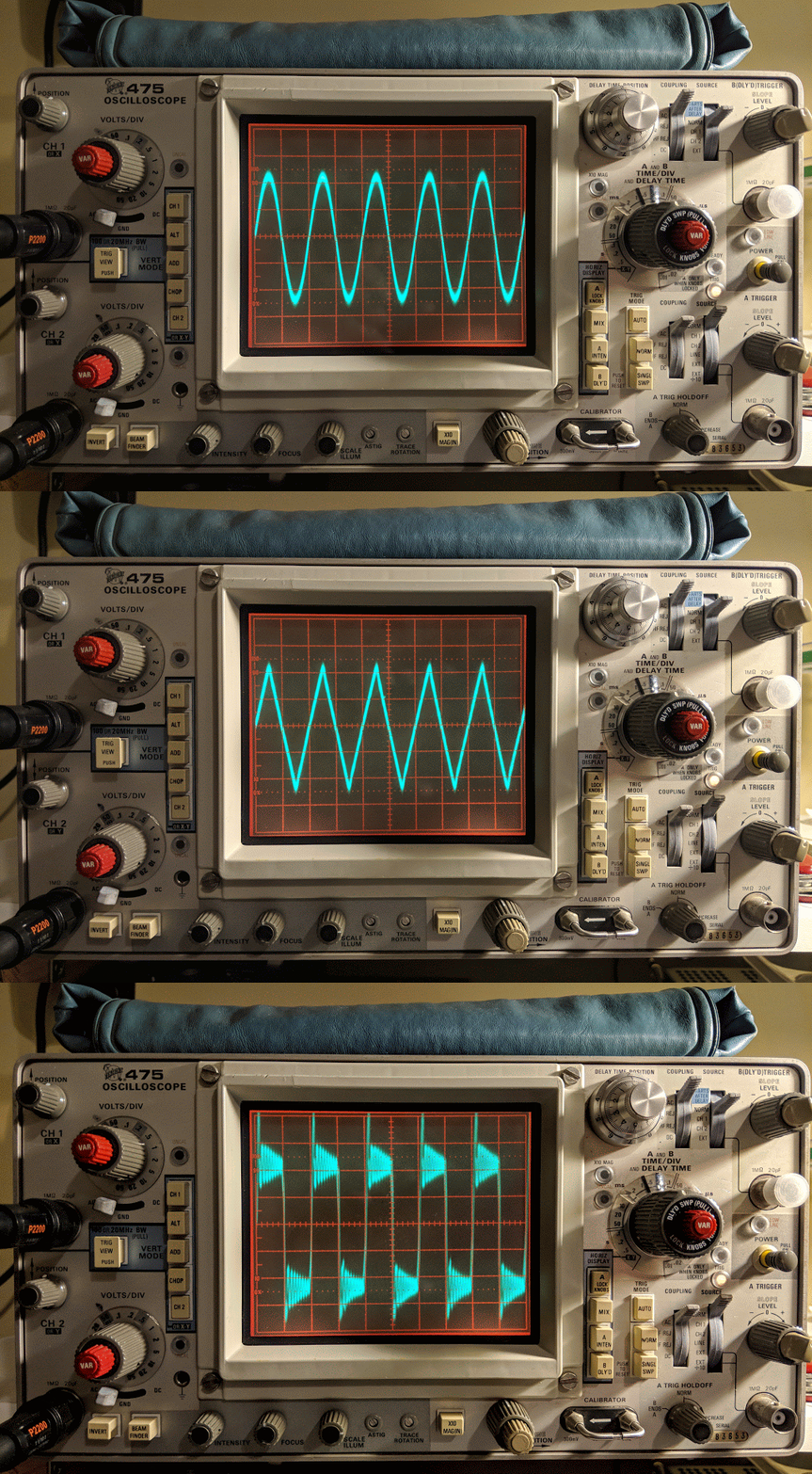
For a free app it is very nice.  It outputs sine waves very well, triangle waves are a bit soft pointed and square waves are for entertainment purposes only.  But it is free so I won't complain.  In the image below you can see the oscillations as it tries to generate a square wave but the audio amplifier of the mobile device just doesn't have that kind of control.

Frequency Generator App set to 1 kHz

Square Wave?

Square waves are not

Reduce the time base to zoom in

Yea, square wave.... not so much

The square wave is bad but sine and triangle waves look good until the frequency get's near the top of the range or the amplitude is raised too high.

Sine Waves look good

Triangle waves are on as well until you go up in frequency


The free app is inadequate for bench testing

While I appreciate that this would be a useful, portable signal generator for testing audio circuits, I'll be ordering a purpose-built function generator because generating clean square waves is an important test signal to be clean.  I also will need a generator that works above audio frequencies, hopefully up the the IF frequencies of the some of the equipment I'm testing.

Only the beginning

Having an oscilloscope is a new adventure for me.  I have another 1-watter kit ready to build that I've been holding off on because I wanted a scope for troubleshooting.  In the meantime I'm using the scope to watch transistors trigger and measure the timing circuits I'm building and learning how to control the scope.  The Tektronix 475 is a feature-rich analog scope.  If you plan to fix your own equipment or do some homebrew electronics work a scope can come in handy.


That's all for now

Sow lower your power and sample it with a scope

72/73
Richard AA4OO

Saturday, February 10, 2018

The Heathkit HW-101 lives again

Ah, the sweet smell of hot tubes and resistors

Heathkit HW-101 after it's first QSO under new ownership

I completed my rebuild of my Heathkit HP-23B power supply this morning.  There was a bit of frustration on my part as I followed the instructions because they only have photos of a HP-23 which has adjustable bias and no LV switch.  

It left me scratching my head a couple times, and I had to locate a schematic of a HP-23B to complete the work.

Heathkit HP-23B Schematic

I really need to learn more about electronics

In the midst of the rebuild I thought I had a problem with the transformer.  Both low voltage winding taps (275v and 350v) showed very low resistance (about 5 Ohms) to chassis ground, which led me to believe there was a short in the transformer.  

I called my mentor in all things Ham radio, Paul AA4XX, and described the issue.  He walked me through the schematic and had me unsolder a couple points to confirm his guess that all was well.  That double tap, low voltage winding presents very low resistance to ground but it is not a short in the world of AC.  I continue struggling to wrap my head around the differences in AC and DC, but I'm slowly learning and fortunately haven't caught anything on fire yet.

Out with the old, in with the new

Old components

Testing High Voltage

My Multi-meter can only measure up to 600v, so in order to measure the 800v output I used two 3 watt 100 kOhm resistors in series as a voltage divider.  When in use, the MM will read half the voltage.

Voltage divider for measuring the high-voltage output
With the voltage divider the HV power measured 401v which works out to 802v undivided

Completed upgrade


The kit places all the components in the base and the holes that the old big filter capacitors used to be in are now just ventilation.  I need to put a wire shield over those holes because high voltages are present just below, as well as some really hot resistors.  With the top cover back on it, there shouldn't be a problem but the wire mesh shield is still recommended, especially if it's to be used inside a Heathkit speaker, where the top cover is not used.

With the PCB board, all the components are out of sight in the base except the big resistors

Replaced the HW-101 antenna connector with a BNC

Original antenna connector was a RCA with questionable integrity.

Original RCA antenna jack (viewed from inside chassis)

Replaced with BNC jack which fits without enlarging the original hole.

New antenna jack

The old radio now has power 

I replaced the old paper 350v 20uF electrolytic capacitors in the HW-101 and then connected the power cable and switched it on via the switch in the HW-101.  I didn't hear any audio at first and thought something was wrong.  Silly me, those tubes need a bit to warm up.  After a minute I was hearing audio and used the built-in crystal calibrator to check the VFO dial.  It was pretty close to spot on.

I ran through some initial checks according to the Heathkit manual.  Receive worked well.  I listened to some SSB and then dropped down to the 40m CW portion of the band and listened to CW.  I waited about 30 minutes for the tubes to warm up.  I didn't hear any drift on CW stations I was monitoring.

I found an open frequency, checked the plate current and then tuned up, outputting only about 10 watts because I don't know what state of alignment the finals are in yet.  This is the first time I've tuned a tube rig and that was interesting.  You have to peak the preselector in receive mode first, then when in tune mode, quickly work back through the preselector, final tune and load levers to peak the RF output.  It reads more complicated than it actually is.  My OCFD antenna has about a 1.7:1 SWR on 40m so it didn't need much tweaking from the initial settings.

I tuned around and answered N4PGJ, Ron in NY, and had a brief WES exchange.  The relay control time set by VOX delay needs to be bumped up a bit as it was dropping between every word break, but other than that it worked like a charm.

I'll make a video soon, but initial impressions are positive.  The audio quality was astoundingly good, and the CW filter really did a much better job than I expected.  It has a very pleasant sine-wave sidetone rather than the raspy square wave sidetone of my Ten-Tec Century/21.  I really think I'm going to enjoy using this old rig.

UPDATE

I got the rig buttoned up and on the desk.  Here's a video...


Oldie but goodie


That's all for now

So lower your power and warm up those tubes.

72/73
Richard AA4OO

Tuesday, November 14, 2017

Thank you for my signal report

3 numbers can mean a lot


QRP operators strive to make the most out of a little.  So when we receive a signal report it means a lot to us.  But the common signal report, given using the R-S-T System, seems often to be misunderstood by some amateur radio operators.

RST has 3 elements:
  • R stands for Readability.  How easy or difficult is it to copy the characters or words being sent on a scale from 1 to 5, with 1 meaning unreadable ranging up to 5 meaning perfectly copy-able.
  • S stands for Signal Strength.  How strong is the signal on a scale from 1 to 9, with 1 being barely perceptible up to 9, being extremely strong.
  • T stands for Tone.  This is only used to describe a CW signal's tone.  Given modern transceivers there are few cases where you'd send anything other than a 9 meaning perfect tone, devoid of ripple or modulation. You'll rarely hear a report with a Tone report other than 9, but if you hear ripple or modulation artifacts you may send lower numbers but it will likely just confuse the other operator.  If you hear chirp (a rising or falling tone) you may wish to append a 'C' to the RST to indicate that.
I want to concentrate on Readability and Signal strength.

Readability

I believe most of us are guilty of focusing on the signal strength portion of the report rather than readability.  But readability can convey a lot to the operator receiving the report.  

For instance if you have a lot of local noise or if the band is noisy due to magnetic disturbance or there's QRM or QRN readability may be difficult.  Similarly, if the operator is using poor technique and running letters or words together that affects readability.

It's possible that signal strength may be good or even moderately strong (6 or 7) but for some reason copy is difficult.  It would be worthwhile to send a 2 (Barely readable, occasional words distinguishable) or a 3 (Readable with considerable difficulty) for the 'R' portion of the signal report as in 359.  Then follow up with WITH QRM or WITH POOR SPACING, to make the other operator aware that you're having trouble copying.

I will occasionally have an operator send me a 3 for R but it seems to always be related to low signal strength.  If someone sends you a 3 or a 4 and it's not followed by an equally low signal strength number inquire as to the difficulty in readability.  It may be something you can correct on your end.

Signal

Signal seems obvious but it's not.  

I believe that many operators use the reading on their S-meter to report the Signal strength but different manufacturers calibrate their S-meters quite differently. The difference between S-units is supposed to be 6 dB but that's often not the case.  On many rigs the use of the preamp or the attenuator also effects the displayed S-meter reading.  So the S-meter is not an accurate reflection of what Signal strength is supposed to convey.  

My old Ten-Tec Century/21 doesn't even have an S-meter.  Neither do my homebuilt QRP radios.

So, what should we be using?  Well how about the actual meaning of the system:
  1. Faint—signals barely perceptible
  2. Very weak signals
  3. Weak signals
  4. Fair signals
  5. Fairly good signals
  6. Good signals
  7. Moderately strong signals
  8. Strong signals
  9. Extremely strong signals
Obviously this is a subjective report, but on my KX3 my S-meter may read 2 when the signal actually sounds Good (6), so I send a 6 even though the meter reads 2.  If I were to send the other station the S-meter reading of 2 they'd assume I'm barely copying them, because I sent them a 529.

I think you can start to see the point.  Use the system as it was designed, before radios had S-meters and the Signal report will have more meaning to the station receiving the report.

My Ten-Tec C21 doesn't have an S-meter but it does have AF and RF gain controls.  I will commonly run my AF gain at a high level and use the RF gain to control the volume of the received signal.  This increases the SNR (signal to noise) and gives me a relative gauge of how strong the sender is.  If I have my RF gain turned all the way down and still clearly hear the other station they have an extremely strong signal (9).  If I have to turn my RF gain all the way up just to copy then the signal is very weak, or faint (2 or 1).  In between those extremes I offer a relative report based on the signal strength  I  am hearing.

So, use the system as it was intended

So, reconsider how you give a signal report.  Think about the original intent of the R-S-T System and you'll be conveying far more information in your report that may help the other station know for certain how they are being heard.

I start most QSOs at QRP levels.  If the other station sends me a report that is below a 5 in readability or a signal strength 5 or below I change antennas or raise power, if I'm able, to make their copy of my station more pleasurable, but if they send me a 599 when they are barely copying me or losing me in QSB then how can I know to make a change?

Maybe this is a radical idea but for my own operation I will strive to start sending more accurate reports and help the other station truly know how they are being copied.


That's all for now...

So lower your power and raise your expectations

72/73
Richard, AA4OO

Tuesday, October 10, 2017

CW tone comparison C21 to KX3

The old ways are sometimes best

This is a short one.  I haven't found much time lately to enjoy the hobby, but the past few evenings I've been firing up the old Ten-Tec Century/21 and just listening to CW while I tend to other duties.   Tonight, I managed to find time before dinner to have a brief ragchew with fellow SKCC member WV8DH (Dave in West Virginia) using my old rig.  It reminded me how much I enjoy the sound of CW coming out of that radio.


I was too lazy to set the camera up to capture the QSO, but after the QSO I dropped down the band to find a good ragchew going on and grabbed my smartphone and shot a quick comparison of the CW tone presented by the 40 year old TenTec radio and my new, modern, Elecraft KX3. 

After listening to the video I realize that a lot of wonderful sound, including harmonics are not captured by the microphone on the phone and can't be heard in the video.  Nonetheless, I think you'll agree that the older rig has finer CW audio. It's certainly more pleasant to listen to for long stretches.  The KX3 audio still wears me out if I operate more than an hour.  I wrote a detailed post comparing the KX3 to the Ten-Tec Eagle last year that pointed out what I believe the culprit of the tainted audio on the KX3.  The Eagle is presently off the desk and if anything the older Ten-Tec Century/21 sounds even better than the newer Ten-Tec Eagle.

But here's the brief, badly made smartphone video comparison of the C21 and the KX3...

Comparing CW tone from TenTec C21 to a modern Elecraft KX3

That's all for now.  I'm going to be reviewing a nice bug that a friend has loaned me soon.

That's all for now...

So lower your power and raise your expectations

72/73 Richard  AA4OO

Wednesday, January 25, 2017

Hard fought SKCC QSO using the Ten-Tec Century/21

Sometimes you need to move your QSO

My ever changing station configuration
Left to right - Elecraft KX3, Ten-Tec Century/21 with Ten-Tec Eagle on top, the MFJ 493 keyer on the right
4 keys - Navy Flameproof, Kent Hand Key, Vibroplex Bug, N3ZN QRP paddle
The Elecraft AF1 audio filter is sitting unused in front of the Century/21
After starting our QSO the ARRL QST program started right on top of us causing QRM that forced us to move to another frequency
My old Ten-Tec Century/21 is a lot of fun to use and its direct conversion receiver makes CW sound beautiful. But the frequency dial is fairly imprecise so when I asked the station to QSY up 1kHz finding him again was a bit of a challenge.  When I heard him I had to zero-beat him again to make sure I was on the correct side of the direct conversion receivers passband.

Enjoy the QSO and the QRM dodging...


Shooting this video

This video was a bit harder to shoot than what I normally do.  I usually place my camera to one side but I wanted to use my fisheye lens and shoot the QSO from above.  

While shooting I was straddling the tripod with the camera right in front of my face so I was reaching around the tripod to use my keys and get to my keyboard for logging.  It was a bit awkward, and in the video you'll see me bump the VFO while trying to operate the radio because I couldn't really see what I was doing.  It's always fun to add a level of difficulty while making these videos.


That's all for now...

So lower your power and raise your expectations

72/73
Richard AA4OO


Sunday, January 8, 2017

My TenTec Eagle sounds better than my Elecraft KX3

Your eardrums will thank you

Coming back to the hobby in 2015 I re-entered as a CW / QRP operator and I searched for a good QRP radio.  The Elecraft KX3 certainly qualified and it has been a great radio to use, especially when portable.

Elecraft KX3 -- stellar radio for portable QRP operations

But a few months after getting my KX3 an old TenTec Century/21 found it's way onto my desk and through numerous blog entries you may note that for some reason I kept gravitating to use it rather than my KX3 when I operated from the shack, even though the KX3 beats the old C21 technically in absolutely EVERY regard.  I just enjoyed operating CW with the old radio more than the KX3. I couldn't explain why.

Fast forward to late March of 2016.  I purchased a used TenTec Eagle from my friend AA4XX and began using it as my primary radio when I wasn't portable.   Here again the KX3 trumps the Eagle in nearly every technical aspect and offers dozens more features.  I just kept gravitating to use the TenTec radios rather than the Elecraft.

I used the my KX3 for Field Day in 2016 and after I packed up and brought it home the KX3 stayed in my backpack and only came out for portable outings.  It did not go back on my desk.  The KX3 cried little electronic tears while the Eagle gloated...

Ten-Tec Eagle -- compact / simple HF transceiver

Why no love for the KX3?

Time passed, and over the new year break I got to thinking about what I missed about having my KX3 on the desk; like its RX/IQ output for HDSDR and the ease working DX splits using it's dual watch capability and it's integration to logging applications like the ability to trigger CW macros from my logging software.  The list of "nice-stuff" goes on and on since the KX3 contains multiple kitchen sinks...  So I re-organized my desk to make room for the KX3 again and operated with it exclusively over the past few days...

I was getting ear fatigue and my ears rang in the evenings.  This was not the sort of ringing in the New Year that I wanted. I had been previously operating the same amount with the Eagle over the past month without the earaches.  Something was amiss.

Had I finally discovered why I keep going back to my TenTec radios?

Audio, Audio, Audio

So over time, even when I switched back and forth between radios there was a subtle "ouch" occurring when I used the KX3.  I enjoy CW and digging out weak signals can be fun... or it can be painful.  I guess when I sat down to use a radio and my hand hovered between the "Oh-so-feature-rich" KX3 and the "Nice-personality" Eagle my brain was saying "choose the nice personality" you're happier that way.

But there was a underlying reality to the choice I was making.

Just the facts mam

I used an audio frequency analyzer to capture audio from each radio by sandwiching the microphone in my headphones.  It hears what I would hear.  And the graphs tell a tale.

Below is one graph for each radio.  The RED graph line in each chart is the averaged "peaked" frequency output audio during the same QSO.  Ignore the green line as it was just the instantaneous  audio at the time I froze the display between takes.  The CW sidetone on each radio is set to 620Hz.

I re-ran this capture for each radio a few times during a lengthy ragchew between two stations.  The signal strength was around S5-S7.  It wasn't a strong signal which is typical of what I work, especially as the Solar cycle winds down.

I tried the captures with and without noise reduction on each radio.  The RF was rolled off as evenly as I could determine for each and both were set to a DSP filter bandwidth of approximately 400Hz.  Both radios were using the same antenna and everything was as similar as I make it.  RCVR EQ was set flat for the KX3.


Elecraft KX3 CW audio (ignore green graph line)
Ten-Tec Eagle CW audio (ignore green graph line)

The CW audio output from each of the two radios is distinctive

KX3 audio demonstrates
shoulder noise
Eagle has clean audio
There's clearly a CW signal peak around 620Hz in each radio but the KX3 shows a significant shoulder of audio just 9dB down from the peak below the center frequency 

Whereas the Eagle has a clear peak presenting a narrow tone range at the sidetone pitch with narrow shoulders down to the filter width.


Confirmation of my subjective tests

When I saw this I literally said "Aha!"   

This confirmed what my ears and my subconcious had been telling me.  The KX3 is more fatiguing to listen to than the Eagle because it presents more noise in the audio or at least a wider audio signal given the same DSP filter setting.  I've always remarked about my TenTec radios that their CW seemed to float above the noise.  I believe it's related to the cleaner audio filtering. The TenTec Eagle just has cleaner audio out of the box. It has no audio adjustments beyond AF and NR, no menus for fine tuning.  My old TenTec Century/21 sounds the same when using its 500Hz selectivity setting. 

In my opinion Ten-Tec just got CW right.

Yes, I have tried using the KX3 RCVR EQ settings to reduce that lower frequency noise and the problem IMO is that the EQ is more for SSB audio.  I think the Q for each setting is too broad and when I try to reduce the low frequency noise IMO it just makes the audio sound mushy.  I just can't get as "clean" sounding CW tone out of the Elecraft as I can the Ten-Tec.

OK, "sound" is a subjective thing.  No two people will hear the same thing the same way and frequencies that bother me may not bother you, but it seems pretty clear from the graphs that the CW audio from the KX3 doesn't match the Eagle.

Summary

Admittedly, my test involved a very small sample size of one radio from each manufacturer.  It's just that I'd put the KX3 back on the desk after a many month absence and my ringing ears got me to investigate the cause a bit more scientifically.  

I will continue to use the KX3 for portable ops because it is a great self-contained radio and when I work portable I usually operate for much shorter periods so the audio doesn't become an issue.

Man, I hope Ten-Tec can come back from the grave. They sure made some fine radios for CW operators.


That's all for now...

So lower your power and raise your expectations

72/73
Richard AA4OO


Friday, May 27, 2016

Let your fingers do the talking...

Let them play different instruments

Keys left to right
Nye Viking, Kent Hand key, Vibroplex Original Bug, N3ZN ZN-QRP paddle, Palm Single paddle
My collection of keys has grown over the past few months and I find that I like each for their particular qualities.

Keys from left to right

The Nye Viking is somewhere between a traditional J-38 low style American key and a tall European style.  At first I couldn't get any sort of coordination with it even after a couple hours of practice and it stayed in the closet for a few months.  Eventually I wanted to leave a key hooked up to the old Century/21 so I didn't have to move the output of my external keyer so the Viking came back out.  I've finally become accustomed to it and am even beginning to enjoy it as much as the Kent.  I'm amazed at how different two straight keys can be.

The Kent Hand key continues to be my favorite key for straight key operation.  The Kent is operated using your entire arm off the desk and when I send using it above 15wpm I get the entire desk shaking with the motion.  My desk light starts casting dancing shadows across the equipment from the vibration and with the clacking of the key and the blare of the sidetone the world of CW becomes visceral.

The Vibroplex Bug remains at the center of the collection because I have some strange affinity for the quirky bug.  I use it on every QSO where I hear another bug operator or with SKCC operators that are sending faster than 17wpm.  It has a non-cosmetic, yet effective, weight added from an old steel spacer to slow it down to a range of 21wpm to 16wpm and some dental floss around the DIT contact spring to reduce the potential bounce which results in scratchy sounding DITS.

The N3ZN ZN-QRP paddle is a work of art and when I'm working higher speed CW it's my go-to key.  The carbon fiber finger pieces and lightweight clickety action always puts a smile on my face.  I keep it connected to the external Ham Keyer which has a handy knob to for quickly adjusting keyer speed.

The Palm Single to the right is magnetically mounted to a steel base a friend made for me. I pull it off the base when I go portable as it's my go-to key for all my portable operations.  But when I'm at the home station I leave it hooked up to the keyer input on the Ten-Tec Eagle because the Eagle's keyer is only Iambic-B mode and I just can't get used to "B-Mode".  Using a single, non-iambic paddle eliminates the weird timing of the B iambic mode.  I really should learn mode-B since it seems to be standard on Ten-Tec and Kenwood radios. 


The 3 stars in the center are the Kent Hand key, Vibroplex Original Bug and the N3ZN paddle

The 3 keys in the middle (Kent Hand key, Vibroplex Bug and N3ZN paddle) remain hooked up to the Ham Keyer and I move the output of that keyer to whichever rig I'm primarily using at the time.  That keyer uses Iambic-Mode-A which I'm comfortable with and it debounces the scratchiness of the Bug.  I hook the output of the keyer up to either the PTT line on the Eagle or the secondary key input on the KX3.  When using the C21 I just use the Nye straight key.

Debouncing a Vibroplex Bug


Side story on the Bug... If you get a Vibroplex bug and hook it up to the PTT line of your radio you may find that you're missing DITS or that the output sounds broken or scratchy.  The PTT line of many radios is not "buffered" meaning it is reacting to every contact closure.  On a bug, the DIT contact is actually bouncing potentially hundreds of times a second since the contact force is so light and doesn't make a clean closure.  Many keyers will filter out those multiple contacts or bounces.  My old HAM KEYER weight control actually serves as a DIT weight control for the manual keys as well so it's ideal for use with the bug.

KE6EE offered me this nice explanation of what was going on:
The more usual term for the process of dealing with problems of contact closure is "debouncing." Google and you will find lots of interesting visuals and explanations.

The actual start and finish of contact closures and openings in switches, relays and keys, is not a simple off-and-on process but a series of "bounces." Dit contact closures on a bug are likely to be very bouncy. 

Bug dit contact design and bug maintenance and adjustment are critical for minimizing bounce. Ops with Vibroplex-style dit contacts often put a piece of rubber or plastic foam in the U-shaped dit contact spring. The Begali bug uses a unique pointed and spring-loaded dit contact. Many bug ops, from my observations on the air, do not adjust their dit weight properly to minimize a scratchy sound.

Transmitter keying circuits are usually "debounced" in various ways, the simplest perhaps being to put a capacitor across the key contact circuit. A PTT circuit doesn't need to be debounced so it isn't. Keyers often have debounce circuits designed to be used with straight keys and bugs.

Try different keys

So if you are getting into CW try some different keys.  I think you'll be surprised by the differences and find that your mood or situation will dictate the use of one key over another.   Morse keys on the used market aren't expensive if you shop carefully so you can build quite a collection.  They also tend to hold their value if you find that you've obtained a key or two that you just can't grok.


My ever changing station sporting a spiffy new chair

 That's all for now

So lower your power and raise your expectations

73
Richard, AA4OO

Tuesday, March 29, 2016

It's ALIVE !

The 1Watter 40m #551 -- Lives

The 1Watter 40m on it's inaugural QSO
Inside the enclosure

The 1Watter is a kit from kits and parts dot com 

The Universal 1Watter (also called the 1H2O) is a full featured little superhet radio transceiver that you can build for about $50.  It doesn't come with an enclosure, a tuning pot, speed pot or an on/off switch so that will cost extra unless you already have some in the junk bin.

Some of the features include; 
  • 1 mighty watt of output
  • Good selectivity from the 3 crystal filters
  • A VCXO tuned frequency range for the 40m band from approximately 7,020 kHz through 7,039 kHz
  • A built-in full functioned keyer with provision for adding a speed pot and messages
    • Included command button accesses the functions of the electronic keyer
    • Natural sounding sidetone (nicer than my Ten-Tec Century/21)

The Build

The kit is delivered in a box and inside are a couple of brown paper bags stapled together.  Inside one of the bags are a couple of plastic bags with the components.  The other bag contained the header kit.  The ferrite toroid mix types are separated in different unmarked plastic bags so don't mix them up (the instructions tell you which bag has each mix).  If anything is missing the kit supplier (Diz, W8DIZ) is very responsive.  

The kit includes both SMT caps and through hole caps.  I tried to solder one of the SMTs but I didn't have the right kind of tweezers to hold it in position for soldering so I used the through hole caps.

SMT and through hole caps are supplied

This is the 3rd revision of the Universal 1Watter board and I was the first to build the 40m version.  

While the schematic was correct, some of the instructions weren't sorted out properly for the 40m kit.  I related issues as I found them to the designer and he promptly updated the online documentation.

I soldered the components and wound toroids as I had time over a few evenings and the initial voltage tests went well.

using through hole capacitors rather than the SMTs
some of the bits and bobs
build is progressing
close up
XTAL filters give it good selectivity
Everything except the final transistor
AGC circuit

Debugging

When the build was completed I connected the rig to an antenna and heard nothing.

The keying circuit and transmitter worked fine and I verified those functions but the receiver was deaf as a stump.

Thus began a number of days of investigation.  Diz (the creator of the board) guided me through a number of debugging steps.  

The first recommendation was to examine and rewind the binocular toroid balun that transformed the impedance from the xtal filters to the input of the U5 oscillator.  He believed that I may had wound it incorrectly.  I desoldered it and rewound it but that did not resolve the issue.

He then guided me through determining if one of the filter crystals or filter capacitors was bad.  I desoldered a few components as a tests but that did not resolve the issue.

There are 3 identical mixer chips on the board.  I swapped them around as there was a suggestion that there were some faulty chips in one of Diz's shipments.

I then took the board to my Elmer Paul Stroud AA4XX.  He had a signal generator, Oscilloscope and RF detector.  He traced the RF and all looked well but we still were unable to obtain any signal through the U5 mixer.  Lastly we tried disconnecting the AGC transistor to see if it was clamping it and that didn't resolve it either.

Diz asked me to return the radio to him so he could take a look.  After a couple weeks he emailed me saying he thought the BFO xtal might have a problem.  But he later discovered that the oscillator in U5 was not starting up.  Apparently the circuit design had a low Q and needed more current to get the oscillator working.  He modified the design, adding a 16k resistor to the bottom of the board on U5 to get the oscillator going.  After that all was well and he shipped the board back to me.


The FIX for all those problems required an extra resistor connected across U5

Learning from problems

Being the first person to build a particular version of a kit brings its own set of challenges, especially when you're as new to kit building debugging RF problems as I am.  However I'm actually glad the kit didn't work right at the initial build.

The process of debugging the board, was a great learning process.  I studied the schematics and learned, as best I could, the function of each circuit so that I could better understand how to test it.  During the debugging process Diz instructed me that although RF signal generators and scopes are useful you can tell a lot by touching a RF component with an inductive metal object and listening for a buzz or hum from the BFO.


So all-in-all, even though the bug in the board was not due to a error on my part, I'm glad it occurred.  I understand more about superhet radio design than I did before and more than if the kit had worked right off the bat.

On the air

After receiving the board back, I hooked up the frequency XCO potentiometer, paddle, command button, audio and output potentiometer and an external speaker.  I then connected a 12v battery and heard the 1H2O keyer chip announce itself at power up in Morse "1 W". 


Frequency control pot on the left
Volume control, output jack, cmd pot and paddle input
You can change speeds and modify settings via the command button which I have not reviewed yet.  I also plan to add the speed pot so that I can easily change keyer speed without entering the command menu. 

For this first on-air excursion I was using it at the default startup 15wpm keyer speed.  You can default the speed higher with a different resistor value.  


I have a resistor shrink wrapped and connected in-line to the blue-white wire coiling above the radio connecting to the speed pot terminal.  In essence fixing the speed at 15wpm until I add the speed pot.


Ready to transmit


On the air... I was using my paddle out of the photo to the right of the Bug

First On Air QSO

I tuned around and found a strong station at the end of a QSO near 7030 kHz.  

When he sent the final dit-dit I called and WD4AXJ answered my first call.  He was in TN near Knoxville, and I received a 559.  We chatted for about 10 minutes. Sorry about the blurry video.  I thought I'd focused.


After I recorded this video I found an open frequency and sent out my call.  Very shortly thereafter KD2FSH answered my call and reported me as 599! 

Whoo - hoo.  599 for my little 1Watter 40m.

I was transmitting using my 40m attic antenna.  So deed restricted HAMs take note.  You can build a one-watt radio and make contacts using your attic antenna. Haha.

You'll hear in the video there is some weirdness going on with the audio derived AGC.  It is clamping down sometimes and is worse when I don't have the volume turned up very loud.  When I began calling it clamped after every semi-break-in but didn't do it much after that.  I'll have to look into that.

The AGC clamping may be a side effect of the increased gain Diz added to the BFO oscillator.  I'll ask the forum.  

Other than the AGC issue I'm super pleased with the little board.  I touched the heat sync a couple of times after transmitting my side of the qso and it was warm but not really hot.  It seems as though as long as you have a reasonable match to the antenna the power transistor should be happy.

My next steps are to get it in an enclosure and get it out to the Excalibur antenna site to hook onto that nice 40m doublet we put up a couple weekends ago.  I plan to use my efficient little BLT tuner for that purpose.  I will do a further review of the feature set on the keyer and record some more qsos for a later review.

Summary

The band was fairly busy and the little 1Watter did a fine job with stations on nearby frequencies. You can hear some getting around the passband but it is not bad at all.  I'll do some tests to further define it's selectivity but at first glance it is far better than my old Ten-Tec Century/21.  

My calls were answered quickly and I received good signal reports. It didn't sound as though the transmitter was drifting at all during the QSO. That's one advantage of using VCXO in the design.  The disadvantage of using a crystal controlled oscillator for the frequency control is limited tuning range.  The transmitter only has about a 18 kHz tuning range around 7030 kHz and I don't find many of the SKCC folks around that frequency but it is the QRP watering hole for 40m.

It is possible to shift the frequency with some capacitance changes but I think I'll leave it as is for a time and see how many states I can work.

Just imagine.  This little $50 single band kit has good selectivity, a nice built-in keyer with a natural sounding sidetone, and lest we forget... You get a MIGHTY 1 WATT of OUTPUT.  What more could a QRP ham need.


That one-watt of output was sufficient for all the QSOs I attempted tonight.

So lower your power and raise your expectations

72/73

Richard, AA4OO

UPDATE: 04/01/2016

I am still having the AGC pumping issue and others on the list have reported similar issues but only on receive.  It happens to me when I key unless I turn up the volume very high.  I did get it installed in a case but I still need to wire up a real power connector rather than using alligator clips.

!Watter installed in a case

UPDATE: 04/05/2016

After doing quite a bit of reading I learned that the LM386 op-amp used in the 1watter is rather notorious for audio oscillations.  There are a number of suggested fixes.  I went with a 4.7uf cap connecting Pin 7 on U6 (the LM386) to ground.  That hasn't totally resolved the issue but it's much less pronounced now.  


cap fix for LM386 oscillations
I have it in the case with all the proper plugs now (see below) so I'm happy.  I've been making QSOs every day with it and it continues to amaze me and the stations that work me.  It is stable as a rock with regard to frequency and the large knob with the single turn 10k pot seems to work well for tuning.  I have enough control to vary the frequency slightly without having to turn it too much.  The tuning range is only about 20kHz so just 3 frequency markers are plenty to let me know what frequency I'm near.  The selectivity is just fantastic for such a simple little radio.  Diz has created an inexpensive winner.

1Watter in enclosure with all the proper connectors for the case


Information on case and knobs:
JPM Supply


CodeItemQtyPriceGrand Total
44088Aluminum Electronics Project Box 4.73 x 3.62 x 2.09 inches Enclosure1$7.99$7.99
62411Round Knob 1/4 Shaft with White Indicator1$0.99$0.99
62424Knob, 1.28" Black with white indicator, 6mm Shaft with set screw1$0.89$0.89
62405Round Star Knob 1/4 Shaft with White Indicator1$0.99$0.99